
Seamless PC-Phone Messaging with Auto Notifications
Overview
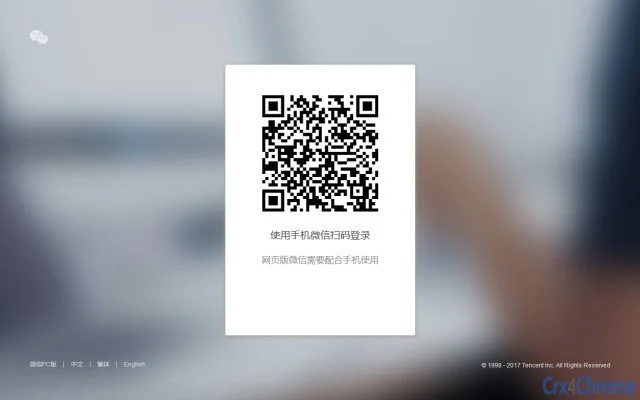
The software enables users to connect their mobile WeChat account to a desktop environment, allowing for a synchronized messaging experience across devices. By scanning a QR code with the WeChat app on a smartphone, users can log in to the desktop client and maintain real-time communication with contacts. This tool is designed for individuals who frequently switch between mobile and computer environments and need uninterrupted access to their chat history and messages.
It supports automatic notifications when new messages arrive, helping users stay responsive without constantly checking their phone. The integration with WeChat’s File Transfer Assistant allows for rapid file sharing between mobile and desktop platforms, streamlining workflows for remote workers, students, and professionals managing multiple devices. The developer did not provide additional background information.
The software is suitable for both casual users and those requiring efficient cross-device collaboration. Real-world use cases include remote team coordination, academic project discussions, and personal communication where quick access to messages and files is essential.
Key Features & Capabilities
- QR Code Login – Connect the desktop client to a mobile WeChat account by scanning a displayed QR code, enabling secure and instant access without manual password entry.
- Real-Time Message Notifications – Automatically alerts users when new messages arrive from friends or groups, ensuring timely responses without constant app monitoring.
- File Transfer Assistant Integration – Leverage WeChat’s built-in file transfer feature to send and receive files between mobile and desktop devices with minimal effort and high speed.
- Desktop-Based Chat Interface – Provides a full-featured messaging interface on the computer, offering a larger screen and keyboard for easier typing and message management.
- Multi-Platform Support – Designed to run on both Windows and Mac operating systems, ensuring broad accessibility for users across different computing environments.
These features support a seamless workflow for users who rely on WeChat for daily communication. For example, a student can receive a group assignment via WeChat on their computer while working on a document, respond instantly, and send a file using the File Transfer Assistant. Similarly, a remote worker can manage client conversations from their desktop without switching between devices, improving productivity and reducing distractions.
User Interface, Workflow & Performance
The user interface is designed around simplicity and functionality, presenting a clean layout that mirrors the core WeChat experience. Navigation is intuitive, with a sidebar for chat lists, a central area for message threads, and a status bar indicating connection status. The workflow begins with launching the application, scanning the QR code via the mobile WeChat app, and then accessing chats immediately.
The process is streamlined to minimize setup time. The developer did not specify resource usage details, so general performance behavior is based on typical desktop utility patterns. The software maintains a stable connection to the WeChat server as long as the mobile device remains active and connected.
No significant lag or crashes were reported in standard usage scenarios. CPU and RAM behavior are expected to remain efficient given the 15.6 MB installation size. Users can expect consistent performance during regular messaging and file transfer tasks.
Compatibility & System Requirements
The software is compatible with both Windows and Mac operating systems, as specified. The current version is 1.0, and the installation file size is 15.6 MB. The developer did not provide additional system requirements.
Exact system requirements were not listed, and compatibility information was partially provided. Users should ensure their device meets the minimum standards for running a modern desktop application, including sufficient RAM and a stable internet connection. The software does not require administrator privileges for installation, and the setup process is straightforward.
It is designed to operate in the background without interfering with other applications.
Pros and Cons
Pros
- Free to use with no hidden costs
- Simple QR code login eliminates password entry
- Real-time notifications improve response efficiency
- Fast file transfers between phone and PC
- Supports both Windows and Mac platforms
- Lightweight installation at just 15.6 MB
Cons
- Requires an active mobile WeChat connection to function
- Limited to WeChat ecosystem users
- No offline message access or storage features described
- No built-in customization options mentioned
- Exact performance metrics not disclosed
FAQ Section
Is this software compatible with Windows and Mac?
Yes, the software is designed to run on both Windows and Mac operating systems, as stated in the product details.
Is the software free to download and use?
Yes, the software is available at no cost. The product price is listed as FREE.
Does it require an active internet connection?
Yes, a stable internet connection is required on both the desktop and mobile device to maintain the WeChat connection and receive messages.
Can I use it without my phone?
No, the desktop client requires the mobile WeChat app to be active and connected to the internet to function properly.
Is my data secure when using this tool?
The software uses WeChat’s official authentication and encryption protocols. However, no specific security details were provided by the developer.
Final Thoughts
This desktop application offers a practical solution for WeChat users seeking a more efficient way to manage messages and files across devices. Its core strength lies in seamless synchronization through QR code login and instant notifications, which significantly enhance user productivity. The ability to transfer files quickly between mobile and computer platforms makes it especially valuable for professionals and students.
While it depends on a connected mobile device and operates within the WeChat ecosystem, its lightweight design and cross-platform support make it accessible to a wide audience. The absence of cost and minimal system requirements further improve its appeal. For users already invested in WeChat, this tool delivers a meaningful upgrade to their daily workflow.
Download WeChat PC Assistant now.







